Create a Digital Menu in 5 Minutes: Step-by-Step Guide for Restaurants
Create Your Own Digital Menu in 5 Minutes: Step-by-Step Illustrated Guide
You might not be tech-savvy, or your time might be limited. That's perfectly fine. Creating a professional QR menu for your restaurant or cafe is much easier than you think.
Thanks to the panel we developed as Zekmenu.com, you can launch your digital menu in just 5 minutes without needing any technical knowledge or coding skills.
Here is the step-by-step guide to the process, starting from scratch to pasting the QR code on the table.
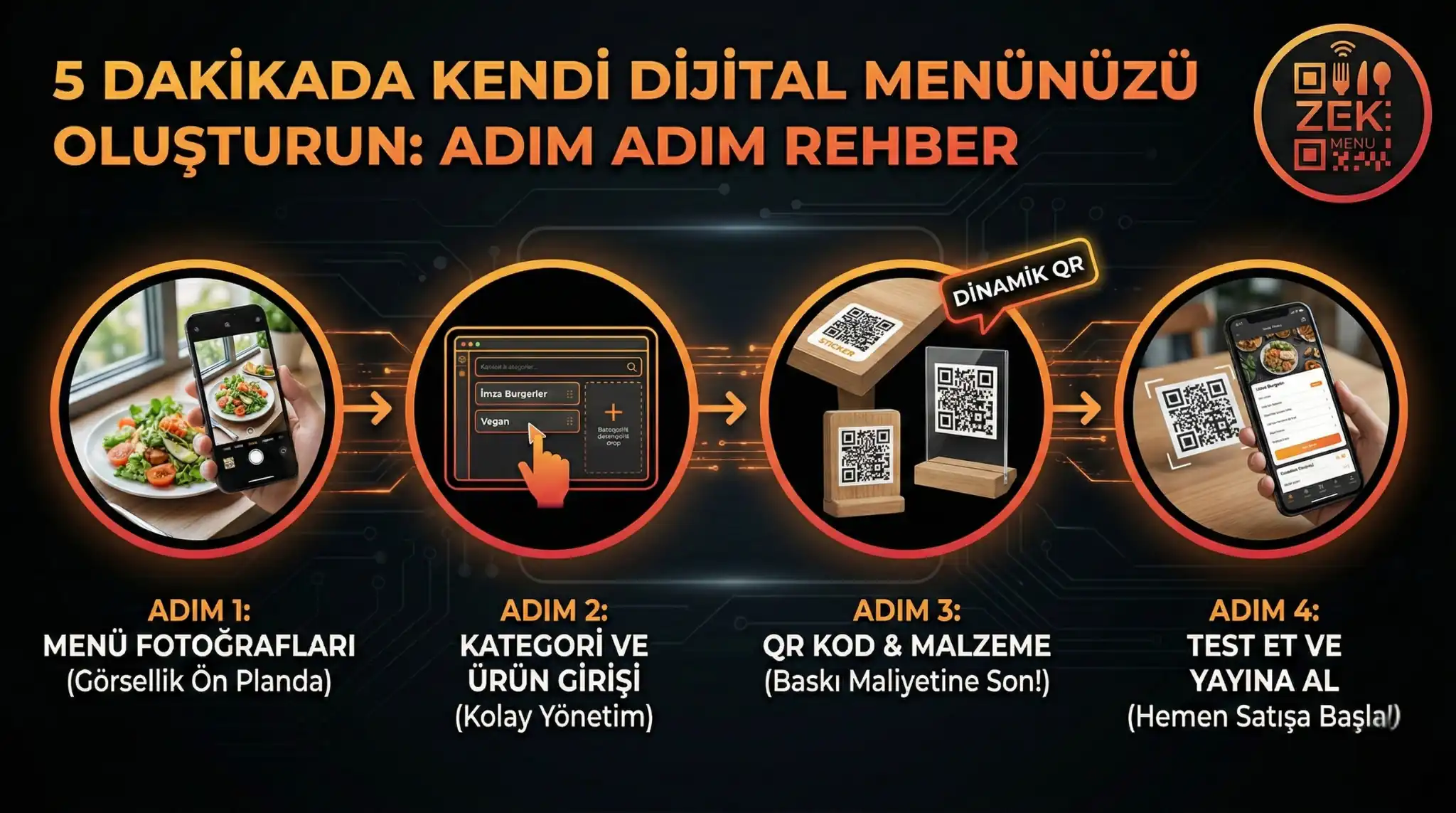
Step 1: Prepare Your Menu Photos (The Power of Visuals)
The biggest difference between a digital menu and a paper menu is "visuality." Remember that visual aesthetics are at the forefront of 2026 trends. Your customers don't read texts; they scan photos.
- Use of Light: You don't need expensive cameras. Place the plate by the window and use natural daylight.
- Whet the Appetite: Photos showing "green" products and fresh ingredients specifically increase sales.
Step 2: Category and Product Entry
After logging into the Zekmenu panel, you must categorize your menu according to the customer's ordering logic.
- Highlight the Stars: Pin your most profitable products (Signature Burgers, Special Cocktails) to the top of the list.
- Allergen Warnings: The 2026 customer wants to know what they are eating. Add tags like "Gluten-Free," "Vegan," or "Spicy" from the panel with a single click.
Step 3: QR Code Design and Material Selection
Once your menu is ready, it's time to bring this menu to the tables. Here, it is important to choose the material suitable for your business concept.
- Sticker: The most economical and fastest solution. It is pasted on the corner of the table.
- Plexiglass (Tabletop): More stylish and durable. It is not affected by wind.
- Wooden Block: Ideal for boutique cafes and steakhouses.
Important Tip: Thanks to the Dynamic QR technology we use, even if you change the menu prices, you do not need to change the QR codes on the table. You get rid of printing costs for a lifetime.
Step 4: Test and Launch
Before printing your QR codes, definitely test them with your own phone. Make sure the menu opens quickly and the categories are sorted correctly.
Remember; the system you set up with Zekmenu is not just a menu, but also an automation tool that reduces waiter costs and prevents order errors.
Conclusion: Don't Wait, Start Now
While your competitors are still dealing with printing price lists at the print shop, go digital in minutes and start selling immediately.
Ready to digitize your menu?
Enjoy QR menu, online ordering and multi-branch management with ZekMenu. Try free for 7 days.
Related posts
2026 Ramadan Menu Suggestions for Restaurants
Prepare your business for Ramadan 2026. Increase your revenue with Iftar menu examples, suhoor packages, and digital menu advantages.
ZekMenu Customization Options and Brand Identity
Customize your digital menu with your brand's logo and corporate identity. Discover ZekMenu's advanced theme and design options.
ZekMenu Setup Guide: Digital Menu in 10 Minutes
Create your digital menu in 10 minutes without technical knowledge. Practical guide to ZekMenu installation, product addition, and QR code creation.